I’m a Java developer. For years, I’ve had a testing stack I trust — Serenity BDD with the Screenplay pattern for acceptance tests, PIT for mutation coverage, ArchUnit for architecture boundaries. When I know my tests communicate behavior, not just verify it, I sleep well.
Then AI changed my daily work. More and more of what I build is in Python — AI agent platforms, automation tools, infrastructure glue. And when I reached for the Python equivalent of my Java testing stack, it wasn’t there.
pytest-bdd exists and it’s solid for connecting Gherkin to step definitions. But the Screenplay pattern — Actor, Task, Interaction, Question — didn’t have a Python implementation. No framework captured what each actor did during a scenario. No report showed the narrative between steps. So I built one.
The Problem: Python’s BDD Gap
In the Java world, Serenity BDD gives you the Screenplay pattern out of the box. Every action an actor performs is captured, narrated, and rendered into rich HTML reports. When a test fails, the report shows exactly which interaction broke, what the actor was trying to do, and what went wrong. You debug from the report, not from the code.
Python has no equivalent. pytest-bdd connects Gherkin to step definitions, but the reports are flat: a list of steps, each marked pass or fail. No actor narration. No trace of what happened inside a step. No distinction between a Task (business goal) and an Interaction (atomic action).
Behind each Gherkin step, the typical Python implementation is a procedural script — client.post(url, json=data), store result in a shared dict, assert later. The Gherkin tells a story. The code behind it is a transaction script. The report shows neither.
There’s also a maintainability problem. With raw step definitions, every scenario builds its own setup from scratch. Need to create a workspace and add an agent? You write the same three API calls in every scenario that needs that setup. The Screenplay pattern solves this with composable, reusable building blocks — an Interaction wraps one API call, a Task composes several Interactions into a business operation. Write CreateWorkspaceWithAgent once, reuse it across hundreds of scenarios. When the API changes, you update one Interaction, not fifty step definitions.
When you have hundreds of acceptance tests across multiple bounded contexts, both problems compound. Failing tests don’t tell you what happened, and duplicated setup code makes every API change a multi-file refactor.
The Solution: Screenwright
Screenwright brings the Screenplay pattern to Python and integrates with pytest-bdd as a zero-config plugin. Install it, run your tests, and get a self-contained HTML report with full actor narration.
The core primitives:
- Actor — a named persona who performs actions and remembers facts
- Ability — what an actor can do (e.g.,
UseApi,ManageTodos) - Interaction — an atomic action through an ability (e.g.,
CreateItem,PostToEndpoint) - Task — a composed business operation built from interactions (e.g.,
add_todo,FullyEnableTool) - Question — a query about system state (e.g.,
TodoCount,TheResponseStatusCode)
Every attempts_to, every should_see_that, every ability grant — screenwright captures it as a domain event. 17 typed events (frozen dataclasses) form a complete trace of what each actor did during a scenario.
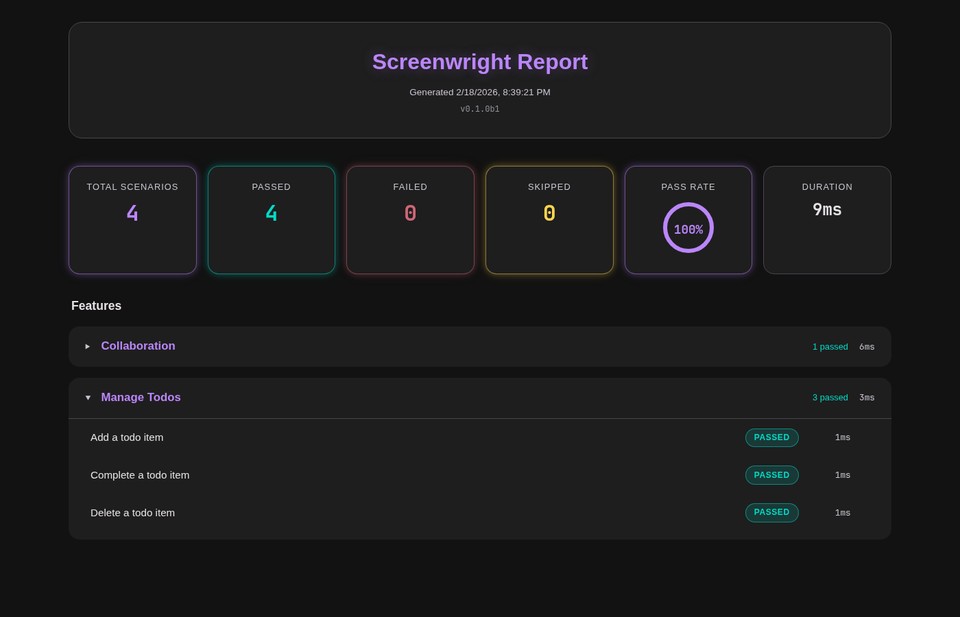
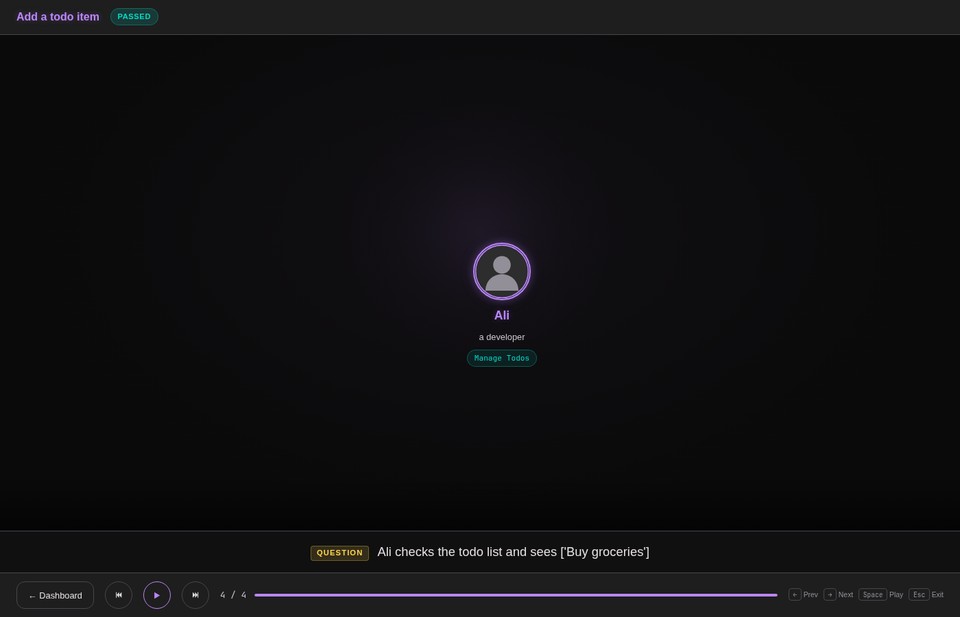
One thing I always felt was missing from Serenity BDD was a truly cinematic report — something that presents each scenario as a visual narrative, not just a table of steps. So I prototyped that into screenwright. The report renders each scenario as an animated presentation: actors enter a stage, ability badges glow, narration subtitles describe each action, and you can step through the entire scenario with arrow keys or autoplay. It’s built with Lit Web Components and Material Design 3 dark neon theming.
Why This Matters With AI
Acceptance tests answer one question: did the AI build the right thing? When AI writes your code, you need a way to verify that the behavior matches your intent. Screenplay-based acceptance tests are one of the most effective tools for this. You define the expected behavior in Gherkin, AI implements the code, and the test suite confirms whether the result matches.
With screenwright, you can have AI publish the cinematic reports automatically on every build. The reports become a living dashboard of system behavior — not just pass/fail, but a narrated walkthrough of what each actor did in each scenario. You can review what the system actually does without reading a single line of code. When something looks wrong, you know exactly which interaction deviated from what you expected.
The structure also helps AI maintain the codebase as it grows. When the Screenplay pattern is in place — clear Abilities, reusable Interactions, composed Tasks — AI has a well-defined structure to follow. It knows where to add a new API interaction, how to compose it into a task, and where to define a new question. Clear structure scales. Procedural step definitions don’t. On a large project, the difference between an AI that produces consistent, maintainable test code and one that duplicates setup logic across fifty files comes down to whether you gave it a pattern to follow.
What This Looks Like in Practice
Here’s a real test from a todo app example. The Gherkin:
Scenario: Add a todo item
  Given Ali has an empty todo list
  When Ali adds "Buy groceries" to his todo list
  Then Ali should see 1 todo item
The step definitions using screenwright:
@given("Ali has an empty todo list", target_fixture="ali")
def ali_has_empty_todo_list(stage, shared_api):
    ali = stage.actor_named("Ali", description="a developer")
    ali.who_can(ManageTodos.using(shared_api))
    return ali

@when(parsers.parse('Ali adds "{title}" to his todo list'))
def ali_adds_item(ali, title):
    ali.attempts_to(add_todo(title))

@then(parsers.parse("Ali should see {count:d} todo items"))
def ali_should_see_count(ali, count):
    ali.should_see_that(TodoCount(), count)
Each attempts_to and should_see_that call emits events. The report renders them as a narrative with timing, actor perspective, and hierarchical nesting (tasks expand to show their interactions).
In production, I use screenwright across 9 bounded contexts in a platform called absotively. The test suite captures 12,042 events — 987 interactions, 65 tasks, 12 questions — and renders them into a cinematic HTML report with Material Design 3 dark neon theming, animated step presentations, and a dashboard overview.
The integration is conditional: by default, tests run silently without screenwright (-p no:screenwright). When you need reports — for CI publishing or debugging — enable it with -p screenwright. Same tests, same behavior, optional narration.
How to Build This In
Install screenwright:
pip install screenwrightThe pytest-bdd plugin auto-registers. No conftest changes needed for basic usage.
Step 1: Define abilities. Wrap your system-under-test interfaces:
class ManageTodos(Ability):
    def __init__(self, api: TodoApi):
        self.api = api
Step 2: Define interactions. Each atomic API operation becomes an Interaction:
class CreateItem(Interaction):
    @staticmethod
    def called(title: str) -> "CreateItem":
        return CreateItem(title)

    def perform_as(self, actor: Actor) -> None:
        api = actor.ability_to(ManageTodos).api
        api.add(self.title)
Step 3: Compose tasks. Multi-step operations become Tasks using the @task decorator:
@task
def add_todo(actor: Actor, title: str) -> None:
    actor.attempts_to(CreateItem.called(title))
Step 4: Define questions. State verification becomes a typed Question:
class TodoCount(Question[int]):
    def answered_by(self, actor: Actor) -> int:
        return len(actor.ability_to(ManageTodos).api.list_all())
Run your tests and a screenwright-report/index.html appears with the full cinematic report. One self-contained HTML file, no external dependencies, ready for CI artifact publishing.
The Takeaway
Tests should communicate behavior, not just verify it. Screenwright turns pytest-bdd scenarios into narrated stories — each actor’s actions traced, timed, and rendered into a cinematic report. The Screenplay pattern makes tests readable. The reports make failures debuggable. And when AI agents write and maintain those tests, the narration layer becomes a specification that both humans and machines can reason about.
Screenwright is open source and available on PyPI: pip install screenwright.